Tuyệt vời! Dưới đây là bài giới thiệu về Espresso macOS, được thiết kế để thu hút các nhà phát triển web cá nhân:
**Espresso macOS – Công cụ hỗ trợ lập trình Web chuyên nghiệp** 🚀
Chào mừng bạn đến với Espresso, trình soạn thảo web đỉnh cao dành riêng cho macOS! ✨ Nếu bạn là một nhà phát triển web cá nhân đang tìm kiếm một công cụ mạnh mẽ, trực quan và hiệu quả, Espresso chính là lựa chọn hoàn hảo dành cho bạn. 💻
Espresso giúp bạn viết, thiết kế, xây dựng và xuất bản các dự án web một cách tinh tế và nhanh chóng. 💡 Với các tính năng soạn thảo văn bản tiên tiến, Live Preview sống động cùng Browser Xray 🌐, và bộ công cụ CSSEdit siêu việt, mọi dòng code của bạn đều trở nên dễ dàng quản lý.
Tận hưởng cơ sở hạ tầng tự động xây dựng Dynamo 🛠️, giúp bạn tạo nội dung mà không cần máy chủ phức tạp. Đồng bộ dự án với Server Sync ✅, và xuất bản nhanh chóng với Quick Publish – mọi thứ đều được tích hợp liền mạch.
Hỗ trợ đa dạng ngôn ngữ lập trình như HTML, CSS, JavaScript, PHP, Python và hơn thế nữa 🌟, cùng khả năng mở rộng mạnh mẽ qua các plug-in.
**Yêu cầu hệ thống:**
* Phiên bản macOS: Tối thiểu macOS 10.13 trở lên. ⚙️
* Cấu hình tối thiểu: Phần mềm có dung lượng nhẹ (khoảng 25.3 MB), hoạt động mượt mà trên các máy Mac hiện đại, cho phép bạn tập trung vào sáng tạo thay vì lo lắng về hiệu năng.
Espresso mang đến trải nghiệm chuyên nghiệp, giúp các nhà phát triển cá nhân nâng tầm dự án của mình một cách dễ dàng và hiệu quả nhất! 💯
Espresso là công cụ hỗ trợ cho những người làm công việc lập trình Web, với Espresso bạn sẽ dễ dàng hơn để tạo ra một website thú vị, sáng tạo, và nhanh chóng hơn. Espresso giúp bạn trong việc code, design, build, và publish hiệu quả hơn rất nhiều
Với Espresso, công việc biên soạn, lập trình website đã trở nên đơn giản và nhanh chóng hơn bao giờ hết. được kế thừa khả năng từ bộ công cụ DNA và CSSEdit nổi tiếng, việc thiết kế và tùy chỉnh giao diện website hoàn toàn chủ động và linh hoạt.
Nhấn để xem chi tiết
Features
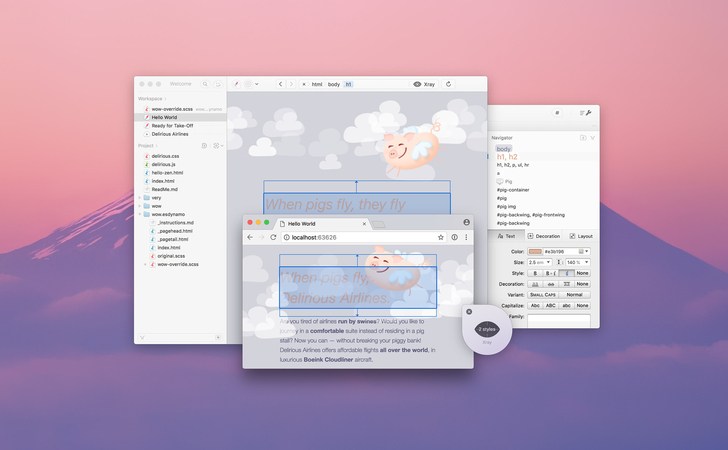
- Browser Preview and Xray Local project? Enjoy the best autorefresh in the business. Xray your page layout to quickly edit relevant styles. The best part? It works in Chrome, Firefox and Safari (including Technology Preview).
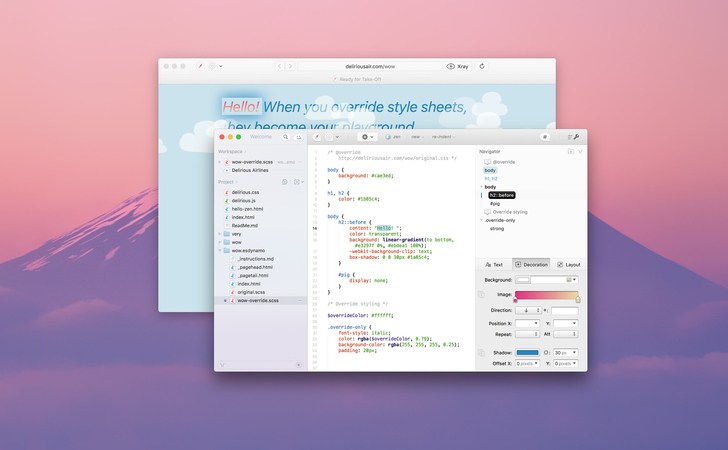
- Overrides with Live Styling and Xray Change CSS for live sites and see your design update in realtime. No need to publish, reload or even save. Only Espresso makes playing with live projects this fun, easy and nondestructive.
- CSSEdit Tools for Supercharged Style Sheets The new Espresso lets you build firstclass standard CSS, but also modular SCSS and LESS. Styling is a joy with the beautiful Navigator, autobuilding by Dynamo and incredible integration with Live Preview and Overrides. Our awardwinning CSSEdit visual tools and code formatting live on inside Espresso, with frictionless editors for colors, gradients, shadows, layouts and more available for standard and dynamic CSS. Everything just works.
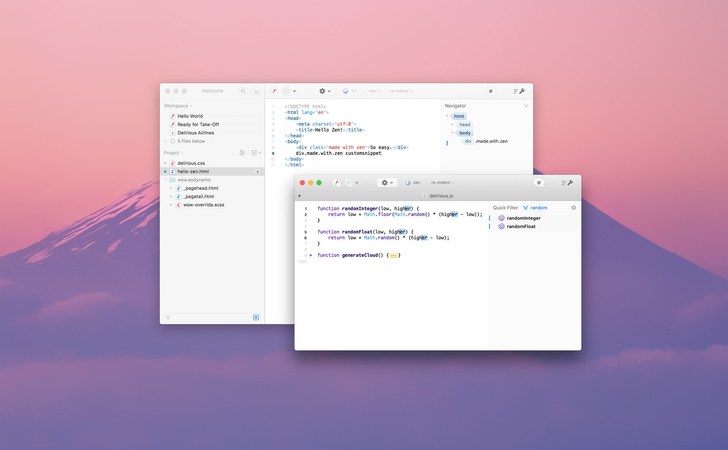
- Zen Snippets Zen shortcuts let you combine and expand abbreviations based on tags and custom snippets.
- Toolbar Favorites Customize your toolbar with contextual actions, snippets and menus for quick access.
- ReIndent Byebye, messy code. Apply custom spacing by example. Works for HTML, CSS and JavaScript.
- Templates For files, folders or projects. Use a builtin one, or save your reusable bits. A real timesaver.
- Workspace Now with the flexibility of tabs while integrating even more smoothly with your project files.
- Open Quickly Switch between documents without taking your fingers off the keyboard. It’s Go time.
- Solid Basics Zippy editing. CodeSense. Folding. Indentation guides. Bracket balancing. All there, quietly helping.
- MultiEdit Make many changes at once, not one change many times. Multiple selections make renaming things a breeze.
- Navigator No mere function menu. Effortlessly navigate your code structure with groups, style previews and Quick Filter.
- Language Support Out of the box: HTML, (S)CSS, LESS, JS, CoffeeScript, PHP, Ruby, Python, Apache and XML. Extensible with syntax plugins.
- Fantastic Find Needle and haystack no more. Project Find and Replace, Quick Filter and colorized regex make searching through files or text a breeze.
- PlugIn Power Espresso comes with an extensive plugin API for actions, syntaxes, formatting, and more. Check out the Power Up section.
- The Dynamics of Static We dig the inherently secure speed of static websites, and the convenience, reusability and flexibility in dynamic content systems. So, we started Dynamo: Espresso’s builtin build infrastructure. It elevates the languages you know and love, producing content without server requirements. Opt in and discover autobuilding with unrivaled Live Preview integration where you need it most.
- Superb CSS SCSS and LESS are popular for their nested rules, variables and functions. Espresso has fantastic support, even when using them with Preview Overrides.
- Markdown and HTML Reuse page components with imports and smart paths. Generate entire folders with template mixins (our blog!).
- InApp Beta Advanced CSS support is solid and absolutely dynamite, but we’re still evaluating some features like folder template mixins. They may change significantly later.
- Say Hello to Clodette With Quick Publish, Server Sync and Quick Browse, you have the right tools for all your publishing needs. Ready for action in the new Clodette overview menu.
- Server Sync Keep entire projects in sync with their server. Also pushing a specific folder to a CDN? No problem! Cloud Attack powers superfast change detection and parallel transfers.
- AppWide Favorites Server credentials are now saved globally or not at all, ideal for oneoff transfers. Many sites on one server? One favorite can power multiple Project Servers, each connecting to its own folder.
- Quick Publish on Save Introduced way back, autouploadonsave is still a goodie. Use the action menu for more manual control. All seamlessly integrated with your Project Servers projectwide or folder specific.
Tương thích: macOS 10.12.2 trở lên
Espresso_5.3.1
👉💕Tải Về
Espresso_5.3.2
👉💕Tải Về
Espresso_5.4.1
👉💕Tải Về
Espresso_5.5
👉💕Tải Về
Espresso_5.6.1
👉💕Tải Về
Espresso_5.7
👉💕Tải Về
Espresso 5.7.1
👉💕Tải Về
Espresso_5.8
👉💕Tải Về