

Admin
04/12/2025
Share
## Patch Viewer macOS – Ứng dụng xem file Patch đỉnh cao cho người dùng cá nhân ✨
Bạn đang tìm kiếm một giải pháp đơn giản và hiệu quả để xem các tệp patch trên chiếc MacBook yêu quý của mình? 💻 Hãy để **Patch Viewer macOS** giới thiệu đến bạn một công cụ mạnh mẽ, được thiết kế đặc biệt cho người dùng cá nhân, giúp bạn dễ dàng quản lý và xem các file patch một cách trực quan nhất. 🚀
🌟 **Patch Viewer macOS** mang đến trải nghiệm xem file patch mượt mà và nhanh chóng. Ứng dụng này hỗ trợ đa dạng các định dạng patch phổ biến như traditional, context và unified diff, giúp bạn làm việc hiệu quả với các công cụ kiểm soát mã nguồn như Git, Subversion, Mercurial, và CVS. 📂
✅ **Yêu cầu hệ thống:**
* Phiên bản macOS: Yêu cầu **macOS 10.8 Mountain Lion** trở lên. 🏔️
* Cấu hình tối thiểu: Máy Mac với bộ xử lý **Intel (64-bit)**. 💡
✨ Tính năng nổi bật:
* Xem file patch trực tiếp 🔍
* Tích hợp với các công cụ so sánh đồ họa bên thứ ba (ví dụ: Xcode’s FileMerge) 🤝
* Hỗ trợ định dạng diff đa dạng 🔄
* Khả năng nhận dữ liệu diff qua dòng lệnh (standard input) ⌨️
💖 Với giao diện thân thiện và các tính năng cần thiết, Patch Viewer macOS là sự lựa chọn hoàn hảo cho mọi cá nhân muốn tối ưu hóa quy trình làm việc với các tệp patch. 🚀 Hãy tải ngay để trải nghiệm sự khác biệt! 🎉
Patch Viewer allows you to view patch files (or the output from diff-like command-line tool) using your existing third-party graphical file comparison tool such as Xcode’s FileMerge.
Diff output in traditional, context and unified formats from a range of command-line source control tools such as Git, Subversion, Mercurial and CVS (to name a few) is supported.
Patch Viewer supports patch files or diff output generated from text file comparisons only – no binary file comparison support.
Patch Viewer can be used on the command-line to receive diff data piped into it as standard input.
Patch Viewer is configured by default to use Xcode’s FileMerge to display file comparison data. It also supports any file comparison tool that can be launched with source and destination files as command-line arguments. You can configure custom command-line arguments to pass to your third-party file comparison tool in Patch Viewer’s Preference panel.
Note that Patch Viewer uses only the standalone content of the patch file, without reference to the original files from which the patch was generated. It reconstructs the partial original files by filling them with blank lines, then positioning whatever content is in the patch file at the appropriate line numbers. This can result in large amounts of vertical ‘padding’, but it ensures the resultant diff displayed by your graphical file comparison tool is line-accurate compared to the original diff that generated the patch file.
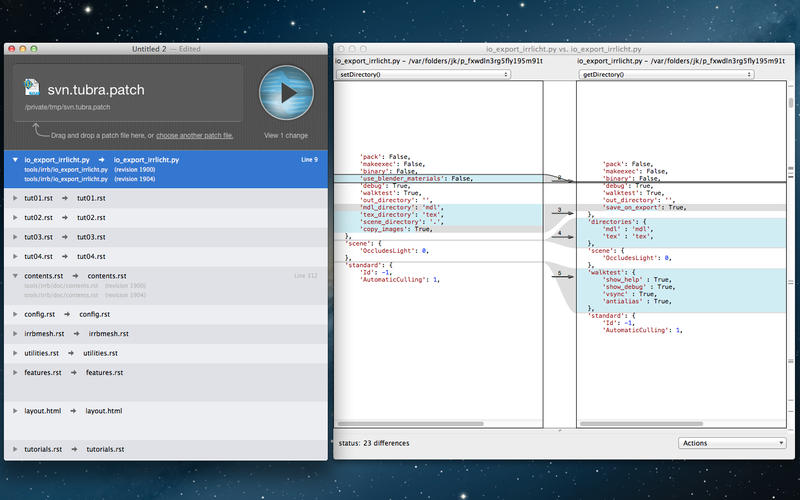
Patch Viewer









