TunesKit Screen Recorder MacOs – Ghi màn hình, âm thanh

Admin

03/12/2025

Share

screen recorder 2

Tuyệt vời! Dưới đây là bài giới thiệu về TunesKit Screen Recorder cho macOS, được thiết kế cho người dùng cá nhân, với đầy đủ các yêu cầu của bạn:

**TunesKit Screen Recorder macOS – Công Cụ Ghi Màn Hình & Âm Thanh Đa Năng Cho Mọi Nhu Cầu Cá Nhân ✨**

Bạn đang tìm kiếm một giải pháp ghi lại mọi khoảnh khắc trên chiếc MacBook của mình một cách dễ dàng và chuyên nghiệp? TunesKit Screen Recorder for macOS chính là câu trả lời hoàn hảo! 🚀 Phần mềm mạnh mẽ này được thiết kế đặc biệt để ghi lại màn hình, âm thanh và webcam của bạn với chất lượng đỉnh cao, đáp ứng mọi nhu cầu sáng tạo và lưu trữ cá nhân.

✅ **Giao Diện Thân Thiện & Dễ Dùng:** Với thiết kế trực quan, bạn có thể bắt đầu ghi lại chỉ với một cú nhấp chuột. 🖱️ Hoàn hảo cho cả người mới bắt đầu lẫn người dùng nâng cao!

✅ **Ghi Màn Hình Linh Hoạt:** Ghi lại toàn bộ màn hình, một cửa sổ ứng dụng cụ thể, hoặc thậm chí là một khu vực tùy chỉnh. 🖼️ Lý tưởng để tạo video hướng dẫn, ghi lại các cuộc gọi video, hay lưu lại những khoảnh khắc game đỉnh cao. 🎮

✅ **Âm Thanh Chất Lượng Cao:** Tích hợp khả năng ghi âm thanh từ hệ thống máy tính 🔊 hoặc micro 🎤 của bạn một cách riêng biệt hoặc đồng thời với video, đảm bảo mọi âm thanh đều được thu trọn vẹn.

✅ **Tính Năng Nâng Cao:** Hỗ trợ lên lịch ghi âm tự động ⏰, tùy chỉnh phím tắt ⌨️, thêm hiệu ứng cho con trỏ chuột, và cắt ghép video ngay lập tức. ✂️

**Yêu Cầu Hệ Thống:**

* **Phiên bản macOS:** TunesKit Screen Recorder macOS yêu cầu **macOS 10.9 (Mavericks) trở lên** để hoạt động tốt nhất. 💻
* **Cấu hình tối thiểu:**
* **Bộ xử lý:** 1GHz hoặc cao hơn. ⚡
* **RAM:** Tối thiểu 256MB RAM (khuyến nghị 1028MB). 🧠
* **Dung lượng ổ cứng:** 200 MB dung lượng trống. 💽

Với TunesKit Screen Recorder, việc ghi lại màn hình và âm thanh trên Mac chưa bao giờ dễ dàng và hiệu quả đến thế! 🎉 Hãy bắt đầu sáng tạo nội dung của bạn ngay hôm nay! 🌟

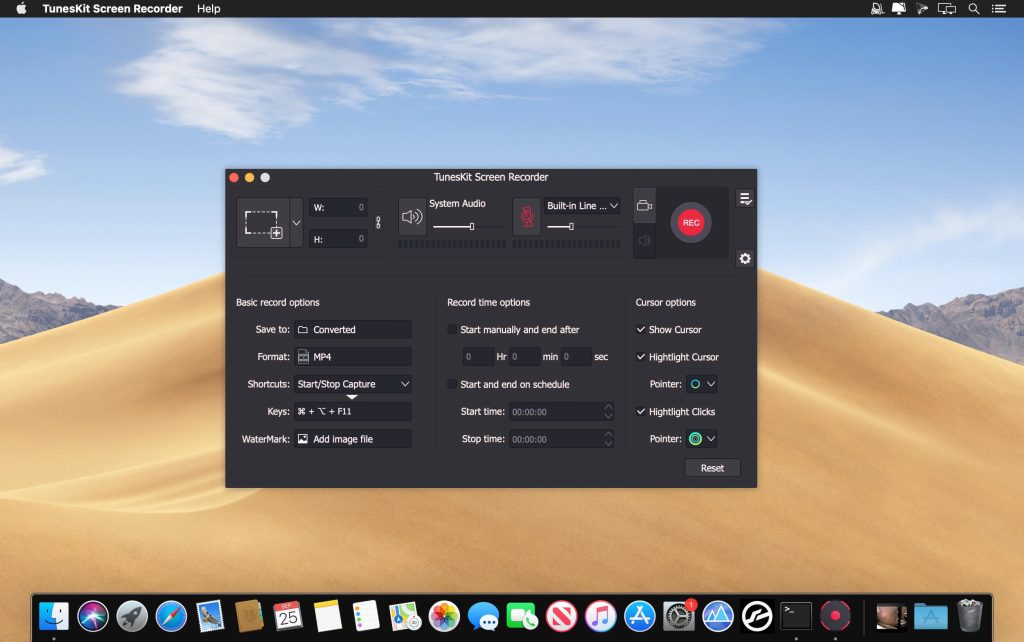
TunesKit Screen Recorder vừa là trình ghi âm, vừa là trình quay phim màn hình chuyên dụng giúp bạn ghi lại bất kỳ video và âm thanh nào từ bất kỳ nguồn nào trên màn hình máy tính của bạn chỉ với một cú nhấp chuột, đồng thời chỉnh sửa và lưu các bản ghi ở bất kỳ định dạng và thiết bị nào với chất lượng cao.

Chi tiết tính năng (chịu khó đọc tiếng Anh)

Interesting facts about this article

Nhấn vào đây để xem chi tiết
Efficient screen recording tool to grab anything you want from desktop
Powerful as it is, TunesKit Screen Recorder is capable of recording anything you like on the PC or Mac screen, such as online videos, computer games, app tutorials, how-tos, video lectures, webinars, video conferences, video calls, live broadcasts, and much more in an easy way. It’s not only a high-quality video recorder, but also an independent audio capture that allows users to grab any audio from system sound and/or microphone, including streaming music, sound effects, background music, or other appearing sound through browser, media player or many other applications. In addition, you can also extract audio from videos on the computer, etc. with lossless quality.

Record screen video and audio separately or simultaneously
TunesKit Screen Recorder enables users to record video and audio from screen, microphone or webcam. What if you want to record just video or audio? It’s easy! The program offers two options for users: record video (with audio) or record audio only. In other words, you can record screen video along with audio, or even mute the sound; you can also choose to capture merely audio, either system sound or microphone audio or both at the same time. You’re given full flexibility to do whatever according to your needs.

Flexible options for users to adjust the settings
With TunesKit Screen Recorder, you can set your preferences as you like. For example, you can capture full screen, select areas to record from 176*144, 1280*720 to 1920*1080 or set the size of capture area based on your requirements. Or, you can use the time scheduler to make a scheduled recording while you’re away by setting the start time and end time in advance. Besides, you can also customize your own keyboard shortcuts, add watermark, and highlight your cursor or clicks with different interesting icons.

Record screen and save in any format and device
As an all-round screen recording utility, TunesKit Screen Recorder offers you the ability to save recordings on the computer in numerous formats such as MP4, M4V, MOV, MKV, WMV, MPEG, 3GP, WebM, 4K HD videos; MP3, M4A, M4B, AAC, FLAC, WAV, and many others. You can also preset and transfer your recordings to various portable devices like iPhone, iPad, Apple Generic, Galaxy phone and tablet, Huawei and other Android Generic as well as game consoles and smart TVs etc. In addition, you’re allowed to upload and share the recording to social media platform such as YouTube, Facebook, Vimeo, etc.

Output high resolution recordings
With the advanced recording technology adopted in the program, TunesKit Screen Recorder is a perfect tool to capture any footage while keeping the high original quality. To be specific, this professional video capturing software can record screen in high resolution at up to 60 frames per second.

Tương thích: OS X 10.9 or later 64-bit

Trang chủ: www.tuneskit.com/screen-recorder/

TunesKit.Screen.Recorder.1.1.0

👉💕Tải Về

TunesKit_Screen_Recorder_2.0.0

👉💕Tải Về

TunesKit Screen Recorder_2.2.0

👉💕Tải Về

TunesKit Screen Recorder_2.4.0.45

👉💕Tải Về

0903064855
0979106855