Admin
03/12/2025
Share
**xScope macOS – Đo kích thước, lấy mã màu trên màn hình** 🎨✨
Chào bạn! 👋 Khám phá xScope macOS – công cụ đo đạc & lấy màu sắc đỉnh cao, được thiết kế để hỗ trợ đắc lực cho mọi nhu cầu sáng tạo trên MacBook của bạn. Dù bạn là nhà thiết kế 🖌️, lập trình viên 👨💻 hay đơn giản là người yêu thích sự chính xác, xScope sẽ giúp bạn làm việc hiệu quả hơn bao giờ hết! 🚀
* **Thước đo chính xác:** 📏 Đo lường kích thước, khoảng cách với độ chính xác tuyệt đối theo pixel.
* **Bảng màu thông minh:** 🌈 Lấy mã màu bất kỳ trên màn hình với công cụ Loupe, hỗ trợ nhiều định dạng (HEX, RGB, HSB).
* **Căn chỉnh chuyên nghiệp:** 📐 Cung cấp các đường kẻ (Guides), khung (Frames) và lưới (Grids) giúp căn chỉnh bố cục hoàn hảo.
* **Xem trước đa năng:** 🖼️ Công cụ Overlay cho phép đặt hình ảnh mockup lên trên giao diện web hoặc ứng dụng.
* **Kiểm tra văn bản:** ✍️ Phân tích font chữ, đo lường ký tự và hỗ trợ các ký tự Unicode phong phú.
**Yêu cầu hệ thống:**
* **Phiên bản macOS:** Yêu cầu cài đặt từ macOS 12.3 trở lên. 💻
* **Cấu hình:** Tương thích tốt với các dòng máy Mac dùng chip Intel 64-bit và Apple Silicon (M1, M2…). 🚀
Với xScope, mọi chi tiết trên màn hình của bạn sẽ trở nên rõ ràng và dễ dàng kiểm soát. Hãy nâng tầm trải nghiệm sáng tạo của bạn ngay hôm nay! ✨🌟
xScope đặc biệt phù hợp cho designers & developers, xScope sẽ giúp bạn đo kích thước, lấy mã màu,… phục vụ cho việc thiết kế laylout…
The ten tools that will help you do your job faster and more accurately include:
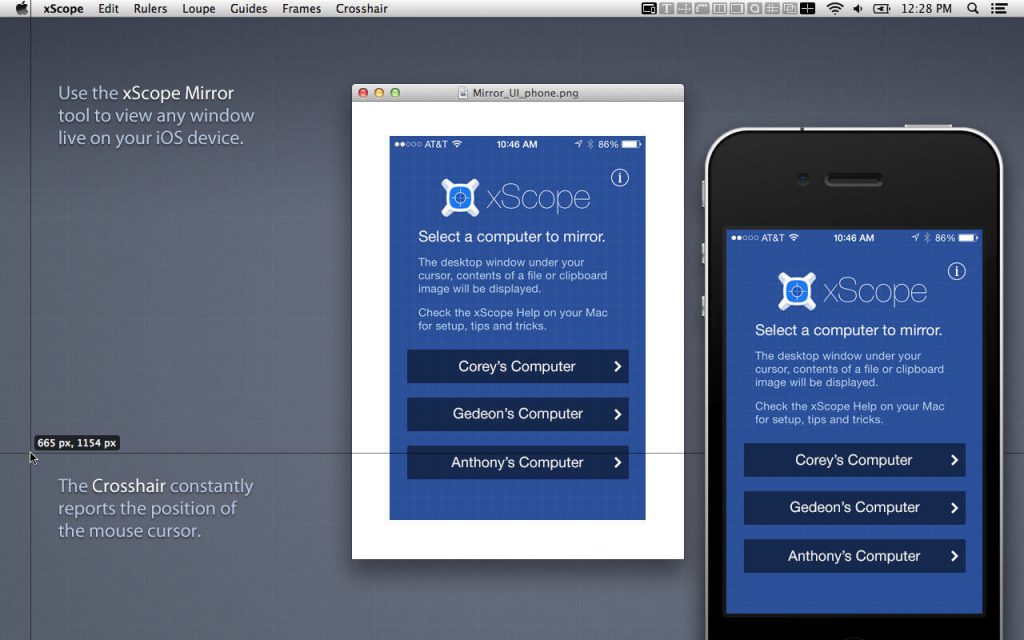
Mirror
Interesting facts about this article
- Remote Viewing – Easily view Photoshop, files or windows on your iOS device, AirPlay, or your wrist.
- Templates – Automatically shows icon or wallpaper mockup on iOS
- Chromeless UI – No overlaid chrome to get in the way while you work
- Security – Toggle user authentication requests on/off via Preferences
- Download the xScope Mirror App for iOS at xscopeapp.com/ios
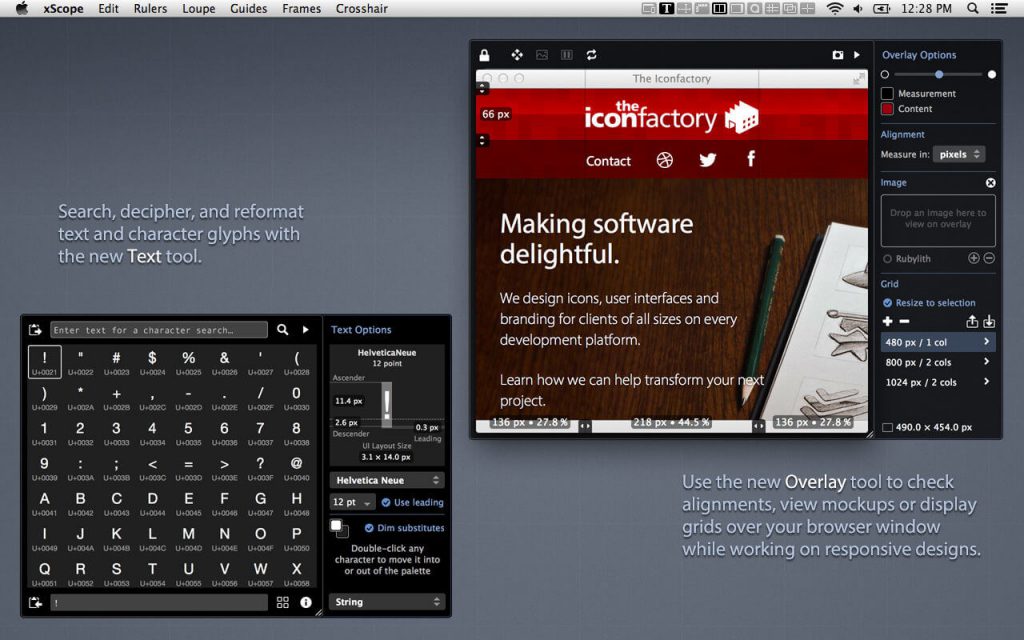
Text – New!
- Powerful Search – For name or tag in any of the 100,000+ Unicode characters
- Decipher Text – Deciphers text entities, encodings, constants, and more!
- Convert Format – Output text as a string, entities, URL encoding, and more!
- Measure Glyphs – Shows line, character or web layout: including font metrics & CSS
- Character Palette – A handy place to collect commonly used Unicode characters
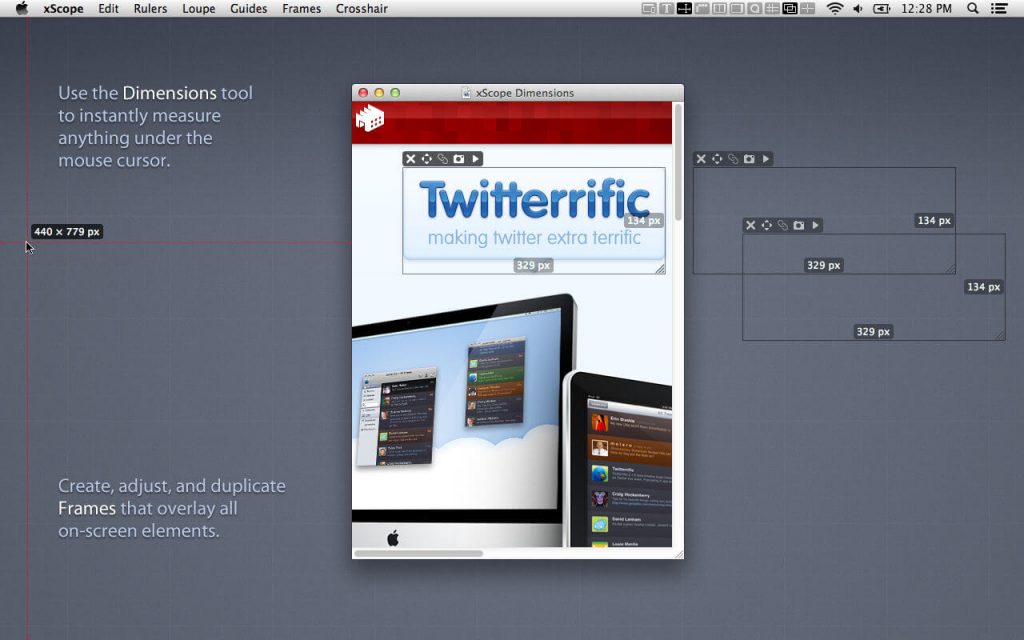
Dimensions
- Find the dimensions of anything on screen instantly
- Find distance between objects quickly & easily
- Create screen shots of any measured element
Rulers
- Powerful on-screen rulers for pixel measurements
- Two rulers with synchronization for easy on-screen comparison
- Hold down control to snap to edges of onscreen content
- Fully adjustable horizontal & vertical lengths
- Full 360 degree rotation range
- Displays deltas for rotated rulers
Overlay – New!
- Enhances Your Web Browser – Attaches to window to make development easier
- Alignment Marks – Check positioning & distances in px/em/pt and percentages
- Mockup Image – A transparent design comp over your HTML and CSS code
- Grids with Breakpoints – Grid systems that stay in sync with your media queries
- Cycle Breakpoints – Quickly check your design at all sizes used in your CSS
- Full-page Screenshot – Get a picture of your whole web page
- Works with iOS Simulator – Great for testing in Safari or developing native apps
Screens
- Easily see the usable real estate for any screen size
- Organized by platform including iOS, Android, Mac, Windows & TV
- Pre-defined screen templates or create your own
- Displays title and game safe areas for 4:3 and 16:9 aspect ratio TVs.
- Simulate user vision problems including color blindness & presbyopia (old age)
- De-retinizer to simulate normal display when using Retina display
- Define custom area settings for any OS or browser
Loupe
- Magnify any portion of the screen under your mouse
- Displays color under your cursor in RGB, HSB, HEX, CSS3 rgb() & HTML
- Quick measurement of magnified image using Dimensions
- Reference color format: work with a hex color while viewing RGB format
- Collect a running list of color swatches with Shift-Cmd-C
- Save out or import .ACO color swatch files for easy reference
- Simulate user vision problems including color blindness & presbyopia (old age)
- Displays co-ordinates of mouse cursor for reference
- The content of the window or the mouse position can be locked
Guides
- Vertical & horizontal guides that float on top of all else on the screen
- Displays guide position in pixels when placed
- Displays distance between guides in pixels
- Save & load guide positions for later reference
- Supports multiple monitors
Frames
- Adjustable marker boxes float on top of the screen
- Hold down control to snap to edges of onscreen content
- Cmd-Shift-5 to shrink a selection around on screen content & create a frame
- Display preset grids to help compose frame layouts
- Create, move, duplicate & edit frames at will
- Save & load frame positions for later reference
Crosshair
- Reports the coordinate position of the mouse cursor
- Change origin from the upper-left (design work) to lower-left (development work)